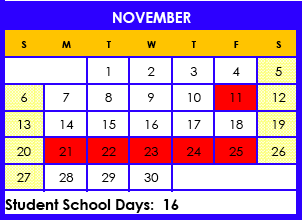
I hope you had a relaxing break. I know I did. It can be hard to get back into the swing of things so take it slow and make sure you are working everyday. The semester is almost over and you will want to finish strong.
I have been busy today ordering books for semester 2 courses. I will be sending out an email copy of your Master Agreement this week so you can look over your planned courses and make any changes as soon as possible.
Check your grades and your progress, and make sure you know exactly what you need to do to get the grades you want this semester.
Let me know if there is anything I can do to help.
Monday, January 9, 2012
Important Upcoming Dates
Monday, January 16 - No school - Martin Luther King Jr. Day
Thursday, January 26 - Last day of LP5 and end of semester 1
Friday, January 27 - No school, teacher work day
Monday, January 30 - No school, teacher work day
Tuesday, January 31 - First day of semester 2, first day of LP6
UC Berkeley Visit
I am working on scheduling a group tour of the UC Berkeley Campus. Berkeley begins to accept tour reservations for Spring term on January 17.
If you are interested in the tour:
1) Email me any absolute times and days you can't come.
2) Email me if you will need transportation.
3) If you are taking college classes next semester, email me your schedule as soon as you have it
When we return from break, I will begin organizing.
Meanwhile, take a look at the UC Berkeley site to see what they offer in terms of campus tours and information.
UC Berkeley Visitor Information
Google Map - UC Berkeley Location
Monday, December 19, 2011
Monday, December 5, 2011
Google Docs
I love the way you are using Google Docs! It is a super way to share assignments with me.
It can get confusing though. So..
I have some guidelines I would like you to follow when submitting your assignments by Google Docs.
Please title your pages like this:
FirstNameLastInitial
Subject
Assignment #
Example:
TamsenB Eng4 #12
Also, please consolidate as much as you can from each assignment into one document. You can put many parts of an assignment in the same document. For example, if you are working on English, go ahead and put all of one assignment in one document and make subtitles for the sections.
This will make it much easier to grade and keep track of your work.
Thanks!
It can get confusing though. So..
I have some guidelines I would like you to follow when submitting your assignments by Google Docs.
Please title your pages like this:
FirstNameLastInitial
Subject
Assignment #
Example:
TamsenB Eng4 #12
Also, please consolidate as much as you can from each assignment into one document. You can put many parts of an assignment in the same document. For example, if you are working on English, go ahead and put all of one assignment in one document and make subtitles for the sections.
This will make it much easier to grade and keep track of your work.
Thanks!
Tuesday, November 29, 2011
Welcome Back
I hope you had a great Thanksgiving. It can be difficult to start back up with work on these chilly dark days, but we must. Grab a cup of hot chocolate, settle in with your computer and your books and knock out a few assignments. Trust me, getting behind will not help :) You should be starting up with your LP4 work today. Your assignments are up in Launchpad and if you have any questions, give me a call. Remember to check your grades in Engrade regularly and contact me with questions. See you soon!
BTW...At our next meeting we will be deciding on the classes you will take for Spring semester and creating your Spring MAs. Give a thought to what you might like as electives so we can make sure you are getting the best from your year!
Book Fair and Student Pictures
Scholastic Book Fair
December 6 - 9, 2011
Tuesday - Thursday: 9:00 am – 4:00 pm
Friday: 9:00 am – 2:00 pm
Carmichael Resource Center
4762-A Manzanita Ave, Carmichael, CA 95608
Click here to see the flyer for the Book Fair!
Lifetouch Photography - Student Picture Opportunity
When: Thursday. December 8, 2011
Time: 10:00 am- Noon and 12:30 pm - 4:00 pm
Where: Main Visions Offices. Building A.
(Home School Orientation Room)
Once again, Lifetouch Photography will be on campus if you would like to have portraits taken of your student(s) and siblings. To purchase with a credit card, go online and purchase your picture package before coming to the school.
Bring your printed receipt for the photographer. Online purchasing gives you a much bigger selection of backgrounds to choose from to create the perfect picture package.
Visit www.mylifetouch.com and enter Visions picture day ID number CR011461Y0. Packages purchased the day of the photo shoot must be paid in cash or check. See linked order form for pricing.
You can also get student school pictures at the book fair from Lifetouch. Click here for the Lifetouch order form.
December 6 - 9, 2011
Tuesday - Thursday: 9:00 am – 4:00 pm
Friday: 9:00 am – 2:00 pm
Carmichael Resource Center
4762-A Manzanita Ave, Carmichael, CA 95608
Click here to see the flyer for the Book Fair!
Lifetouch Photography - Student Picture Opportunity
When: Thursday. December 8, 2011
Time: 10:00 am- Noon and 12:30 pm - 4:00 pm
Where: Main Visions Offices. Building A.
(Home School Orientation Room)
Once again, Lifetouch Photography will be on campus if you would like to have portraits taken of your student(s) and siblings. To purchase with a credit card, go online and purchase your picture package before coming to the school.
Bring your printed receipt for the photographer. Online purchasing gives you a much bigger selection of backgrounds to choose from to create the perfect picture package.
Visit www.mylifetouch.com and enter Visions picture day ID number CR011461Y0. Packages purchased the day of the photo shoot must be paid in cash or check. See linked order form for pricing.
You can also get student school pictures at the book fair from Lifetouch. Click here for the Lifetouch order form.
Word Squad
Visions Students,
The Word Squad, a new online publication of VIE student writing, is seeking student writing submissions. The Word Squad will be a digital publication that will showcase our student writers. We need your writing! We are looking for exemplary writing from any of the English 1, 2, or 3 major writing assignments. Your CT has a complete list of all of the categories for which we are seeking submissions. You can submit writing that you have already completed this school year or any upcoming assignments. You are encouraged to submit writing from more that one category.
During the 2011-2012 school year, we will collect writing submissions. In the spring, a group of teachers will decide which of these submissions will be published in our first edition of The Word Squad. Students whose writing has been chosen for publication will be notified before the end of this school year. In the fall of 2012, Visions in Education will launch The Word Squad with a celebration event that all published writers will be invited to.
Students whose work is selected for publication will receive a certificate of achievement, an invitation to our celebration event, entrance into a raffle for a chance to win a variety of prizes, and best of all...the pride that comes with being a published writer.
There are two easy steps to submitting your writing:
Step 1) Fill out information about yourself and your writing in this Google form. Be sure to read the information at the top of the form.
Step 2) Send your submission to thewordsquad@viedu.org. You can email your writing to this Word Squad email address or "Share" it with this email address through Google Docs.
Please include your name, category(writing assignment description), grade, and teacher's name on your writing.
That's it! Once your writing has been received, you will receive a confirmation email and a certificate of participation.
Come on....send us your writing. By next fall, you could be a published writer! We can't wait to read your work!
The Word Squad Staff
Monday, November 14, 2011
Student Work
Make sure to check out some great student work. Just click on the links to the pages under the Blog heading. I will keep adding things all year!
Upcoming Important Dates
- Friday, November 18 - Last Day of LP3
- Monday, November 21 through Friday, November 25 - Thanksgiving Break
- Monday, December 25 through Friday, January 6 - Winter Break
Monday, November 7, 2011
Student Work
I am so impressed with the quality of work I am seeing in the English projects and writing assignments! You are all doing such an amazing job. I will be sharing some student work on the blog next week. Make sure you came back to take a look!
This Week's ONLINE Meetings
Remember, meetings this week are online. Make sure you have followed the instructions on how to prepare, then just click on the "My Elluminate Room" link on the left at your meeting time.
Tuesday - Online
Audrey - 12 noon
Jalila - 3:30 pm
Wednesday - Online
Ana - 9:00 am
Thursday - Online
Tuesday - Online
Audrey - 12 noon
Jalila - 3:30 pm
Wednesday - Online
Ana - 9:00 am
Thursday - Online
Haven - 12:30
Michelle - 1:30
Tylor - 2:30
Friday - Veteran's Day!
Michelle - 1:30
Tylor - 2:30
Friday - Veteran's Day!
Monday, October 31, 2011
Progress Grades
Learning Period (LP) 2 progress grades have been posted.
To see your Progress grade:
- Log in to Launchpad
- Click on the My Info link (I think this has changed. I can't see what the student sees so please let me know what it is now. I think it might be More Information.)
- Click on My Progress Grades
- Make sure to set the LP. You may have to change the number in the drop down box and click “Set LP”
Look in the progress grade column of your assignment summary
Don't worry about the assignments average and assignments complete columns. They only refer to work done and graded in launchpad. The progress grade column is accurate.
Your Engrade grade may be different from your Progress grade as it may include work that has been done in the new LP.
Let me know if you have any questions!
This Week's ONLINE Meetings
Remember, meetings this week and next are online. Make sure you have followed the instructions on how to prepare, then just click on the "My Elluminate Room" link on the left at your meeting time.
Monday
Christy - 1:30
Wednesday
Anthony - 11 am
Andrea - 12 noon
Angie - 3:00 pm
Thursday
Monday
Christy - 1:30
Wednesday
Anthony - 11 am
Andrea - 12 noon
Angie - 3:00 pm
Thursday
Belinda - 12 noon
Sara - 1:30 pm
Friday
Alissia - 12 noon
Sara - 1:30 pm
Friday
Alissia - 12 noon
Alex - 1:30 pm
Margaret - 3:30
Margaret - 3:30
Upcoming Online Meetings - This Week and Next!
How to prepare:
Meeting online is easier than it looks. There are a few things to do to make sure your computer is ready though. These things take about 15 minutes, but it is important to do them way in advance of our meeting time so you have plenty of time to troubleshoot if you need to.
- Go to: http://support.blackboardcollaborate.com/ics/support/default.asp?deptID=8336&task=knowledge&questionID=1279
- Step One: Check system requirements. The page will do this automatically and give you recommendations or let you know you are ready.
- Step Two: Configuring Your System. Visit the configuration room to see what our classroom will look like and set up your audio.
- Step Three: Training and Resources. Click on the link that says “Recorded Introduction”. Your computer may ask you if you want to accept the files. Make sure to say yes.
Other things to keep in mind when we have online meetings:
- Make sure you are organized and ready to go when the meeting starts. Have all of your work available, and make sure your folder is easily accessible for your assignment sheet and any logs you need.
- You may need to print new assignment sheets, logs or other paperwork, make sure you have a printer available if possible.
- Use Google Docs for journals, essays, and as much other written work as possible. This way we can both view it during the meeting.
- Do as much of your work as possible on launchpad. This way I can have it graded and ready for questions during the meeting.
- Scan photos, pictures of projects, paperwork, etc. We can share files and images in the classroom.
- You can also share links with me and we can look at things together. For example, if you have created a Prezi, a Glogster, a timetoast, or any other web based project, have the link ready for out meeting so we can look at it together.
Monday, October 24, 2011
GoAnimate!
GoAnimate4Schools.com: English Project by Tamsen Bryon
Like it? Create your own at GoAnimate4Schools. It's free and fun!
Holiday Card Contest
Check out the prizes:
- First prize - 9-12: $500
- Second prize - 9-12: $350
- Third prize - 9-12: $150
Download the Flyer
Monday, October 17, 2011
Celebration for Student Success
Visions students who scored proficient or advanced on either the ELA or Math section of last year's CST have been invited to a celebration of their success. This year there were over 900 Visions students receiving this honor. Visions is holding one celebration in Sacramento this evening and the other, for those of us who live in the Bay Area, in Concord on Thursday.
Join me in congratulating the students from our class that have been invited:
Alissia
Ana
Jalila
Margaret
Sara
I hope to see you there!
Google Docs (repeat post from last week!)
Are you using Google Docs yet? If not, try it out. We will be sharing work using Google Docs more and more as the year progresses.
You need a Google account. If you don't have one, please get one before our next meeting.
Go to:
http://docs.google.com/support/bin/answer.py?answer=49008
To get an overview of Google Docs.
And go to:
http://docs.google.com/support/bin/answer.py?answer=47597
To learn how to set up an account.
Make sure you have an account set up by our next meeting so I can show you how to create a document, presentation, or spreadsheet and share it with me!
Monday, October 10, 2011
Worth Watching
"The death of Apple co-founder Steve Jobs, has renewed interest in the commencement address he gave at Stanford University in 2005, which drew considerable attention for its content and because Jobs so rarely spoke in public about himself." ~ NPR
I found it very inspiring :)
Monday, October 3, 2011
SAT/PSAT
What is the SAT?The SAT is an important step in applying for college and making your college dreams a reality. It is the most widely used college admission test.
When is the Best Time to Take the SAT and Subject Tests?
The SAT and SAT Subject Tests are offered several times a year. Most students take the SAT for the first time during the spring of their junior year and a second time during the fall of their senior year.
Where do you Take the Test?
You register through the college board website and choose a location near you when you register.
How do you Register?
Go to http://sat.collegeboard.com/home for information about registering, test schedules and more.
PSAT
If you are interested in the PSAT click here: http://www.collegeboard.com/student/testing/psat/about.html
PSAT
If you are interested in the PSAT click here: http://www.collegeboard.com/student/testing/psat/about.html
Comment Test
I just want to see if you can comment on a post. I might use that ability this year. See if you can comment on this post for me please?
If you could add a course to Visions curriculum, what would it be?
Monday, September 26, 2011
GoAnimate! for English 3 Projects
Are you in English 3 and considering using GoAnimate for your project?
It is super fun!
Check it out:
http://goanimate4schools.com/school/visions
Your user name is your first initial and last name.
Your password is your launchpad user name.
Make sure to bookmark the site and write your user name and password down!
Once you get in, click on the button that says "Create an Animation" and it will show you a tutorial on how to use the program.
If you have any questions, drop me an email :)
It is super fun!
Check it out:
http://goanimate4schools.com/school/visions
Your user name is your first initial and last name.
Your password is your launchpad user name.
Make sure to bookmark the site and write your user name and password down!
Once you get in, click on the button that says "Create an Animation" and it will show you a tutorial on how to use the program.
If you have any questions, drop me an email :)
Internet Explorer and Launchpad
It has come to my attention that Internet Explorer is not compatible with Launchpad.
Some of the issues students have encountered with Internet Explorer are:
* student answers that contain raw html code.
Some of the issues students have encountered with Internet Explorer are:
* student answers that contain raw html code.
* missing functions in the students' text editor toolbar.
* disappearing student answers when the worksheet is submitted.
* start and end times indicated in the Quiz/Test Overview but no blue dot or student answers to indicate completed work.
Please use the most updated version of either Firefox or Chrome instead. Thanks!
* disappearing student answers when the worksheet is submitted.
* start and end times indicated in the Quiz/Test Overview but no blue dot or student answers to indicate completed work.
Please use the most updated version of either Firefox or Chrome instead. Thanks!
Monday, September 19, 2011
Tdap
Have you sent Visions proof of your Whooping Cough immunization?
If so THANK YOU!!
If not, please do it soon. The school's deadline is October 5th and we need everyone's paperwork in by then.
Here is how:
• Get immunized
• Get proof of immunization from your doctor
• Get it to Visions
By Fax: 916.971.5578
By Email: Sue Dominguez at sdominguez@viedu.org
By mail:
Visions In Education Charter School
c/o Sue Dominguez
4800 Manzanita Avenue
Carmichael, CA 95608
If you have any further questions, please contact Sue at 916.971.5525 or toll free at 1.877.971.7037.
If so THANK YOU!!
If not, please do it soon. The school's deadline is October 5th and we need everyone's paperwork in by then.
Here is how:
• Get immunized
• Get proof of immunization from your doctor
• Get it to Visions
By Fax: 916.971.5578
By Email: Sue Dominguez at sdominguez@viedu.org
By mail:
Visions In Education Charter School
c/o Sue Dominguez
4800 Manzanita Avenue
Carmichael, CA 95608
If you have any further questions, please contact Sue at 916.971.5525 or toll free at 1.877.971.7037.
Workbooks Are In!
Many of you will be happy to know that the back-ordered workbooks have come in!
If you have been waiting on an English 3, Psychology, or Earth Science workbook, I will bring it to our next meeting.
Monday, September 12, 2011
Getting Warmed Up
Sometimes it is hard to get back in the habit of proofing your work, answering in complete sentences, and reading the examples and instructions in the books and online.If you have been earning less points than you would like on your assignments, now is the time to figure out why and fix it! Creating good habits now will make the year a smooth and successful one.
Here is how:
- Look over the assignment(s) that you aren't happy with.
- Reread the instructions and examples.
- Redo the assignment, being careful to follow the instructions carefully and proofread your work.
- Email me your corrections. Be careful to include the subject, the assignment #, the section title, and the problem #.
If you don't know why you received a grade lower than you expected, email me and we can discuss it!
Curriculum Corrections
Have you found an error in the curriculum? If so, help me to fix it and earn extra credit points.
If you suspect an error or typo in the curriculum materials on Launchpad or in your workbooks, email me about it. If you are correct, you will earn one extra credit point the subject the error was found in.
If you catch errors in my communications, (emails, blog posts, etc.) you can earn one extra credit point in English for your proofreading and follow up skills!
This will continue all year, so stay sharp and earn extra credit by helping Visions be more accurate :)
Tuesday, September 6, 2011
Welcome Back Everyone!
Ahh, the first day of school :)
Welcome back returning students and welcome to our new students! I am looking forward to a great year.
Ok, so what should you do today? Everyone should have gotten an email yesterday reminding them of our meeting date and outlining exactly what needs to be done before then. If you didn't get one or have any questions about it, please contact me asap. I will be working at home most of Tuesday so I am available to help.
Just take it slow, there are routines to establish, skills to remember, and a summer's worth of habits to undo. Take some time today to think ahead, plan your schedule, and organize your space so you can start strong.
Welcome back returning students and welcome to our new students! I am looking forward to a great year.
Ok, so what should you do today? Everyone should have gotten an email yesterday reminding them of our meeting date and outlining exactly what needs to be done before then. If you didn't get one or have any questions about it, please contact me asap. I will be working at home most of Tuesday so I am available to help.
Just take it slow, there are routines to establish, skills to remember, and a summer's worth of habits to undo. Take some time today to think ahead, plan your schedule, and organize your space so you can start strong.
This Week's Meetings
Wednesday - Antioch Public Library
Anthony - 11 am
Brandon and Haven - 12 noon
Christy - 1 pm
Tyler - 3 pm
Thursday - Benicia Public Library
Justine - 10 am
Ana - 11 am
Belinda - 12 noon
Sara - 3 pm
(Optional book pick up for Jalila and Michelle)
Friday - Concord (Starbucks 1170 Concord Ave.)
Alissia - 12 noon
Alex - 1:30 pm
Margaret - 3 pm
Anthony - 11 am
Brandon and Haven - 12 noon
Christy - 1 pm
Tyler - 3 pm
Thursday - Benicia Public Library
Justine - 10 am
Ana - 11 am
Belinda - 12 noon
Sara - 3 pm
(Optional book pick up for Jalila and Michelle)
Friday - Concord (Starbucks 1170 Concord Ave.)
Alissia - 12 noon
Alex - 1:30 pm
Margaret - 3 pm
Pesky Passwords
Are you having trouble remembering all of your passwords? Here is a quick tip to ensure that your passwords are secure, different for each account you have, and easy to remember!
Things to remember about passwords:
Try to create passwords that are unique to you and unique to the site you are accessing but that are similar enough so you can remember them.
Here is one idea:
Susan Gordon creates her passwords the same way every time. She uses her initials, the first two letters of the site she is logging into and the year she will graduate. If she needs a special character, she uses the same one every time (!) If she is at a site like Launchpad that requires that you change your password every couple of months, she just changes the special character and uses the same two passwords back and forth.
So for launchpad her passwords look like this:
sgla2014! (and sgla2014@)
For Facebook:
sgfa2014
For GMail:
sggm2014
Susan also uses the same user name every time. She uses sgordon515 as often as possible. (Susan was born on May 15.)
Do you have another idea about how to create passwords that are secure and easy to remember? Go ahead and add your comments to this post :)
Things to remember about passwords:
- Many passwords require at least 8 characters.
- Passwords often require a mix of letters and numbers. Sometimes they allow characters like $%^, sometimes they don't, and sometimes they require them.
- Using the same password for many accounts is easy to remember, but it is not very secure
Try to create passwords that are unique to you and unique to the site you are accessing but that are similar enough so you can remember them.
Here is one idea:
Susan Gordon creates her passwords the same way every time. She uses her initials, the first two letters of the site she is logging into and the year she will graduate. If she needs a special character, she uses the same one every time (!) If she is at a site like Launchpad that requires that you change your password every couple of months, she just changes the special character and uses the same two passwords back and forth.
So for launchpad her passwords look like this:
sgla2014! (and sgla2014@)
For Facebook:
sgfa2014
For GMail:
sggm2014
Susan also uses the same user name every time. She uses sgordon515 as often as possible. (Susan was born on May 15.)
Do you have another idea about how to create passwords that are secure and easy to remember? Go ahead and add your comments to this post :)
Wednesday, June 22, 2011
Monday, June 13, 2011
Congratulations!
You made it to the last week of school!
I wish I could adequately express what a wonderful year this has been for me. I have really enjoyed working with all of you. You are the most dedicated and intelligent group of students I have ever seen. I am so proud of what you have accomplished and learned. I'm even impressed by how you have handled the failures and struggles, and by your perseverance and growth. You are all amazing, interesting, remarkable people, and I am honored to work with you.
Wednesday's Drop Off
I will be at three locations on Wednesday. You can bring me your books and any work you want to have included in your final grade.
The schedule is as follows:
- Benicia Library: From 11 to 12
- Concord Starbucks: From 1 to 2 (1170 Concord Avenue)
- Antioch Library: From 3 to 4
Anyone is welcome to come to any location.
Please make sure your books are bundled somehow and clearly marked with your name and your student ID number.
You can also take your books to the Camel Barn in Benicia on the 22nd of June (10 to 2:30), or return them to the resource center in Carmichael if it is more convenient.
Monday, June 6, 2011
This Week's Meetings - A Group
Tuesday – Fairfield Public Library
Mario – 10:30
Maryann – 11:30
Belinda – 1:00
Wednesday – Benicia Public Library
Amanda – 11:30
Audrey – 12:30
Michelle – 2:00
Thursday – Tracy Public Library
Curtis – 12 noon
Tylor - 1:30
Mario – 10:30
Maryann – 11:30
Belinda – 1:00
Wednesday – Benicia Public Library
Amanda – 11:30
Audrey – 12:30
Michelle – 2:00
Thursday – Tracy Public Library
Curtis – 12 noon
Tylor - 1:30
Alternate Drop Off in Benicia
If you forget to bring me your books, or if Carmichael is just too far to travel to return your computer, you have another option.
Visions and SkyQ representatives will be in Benicia at the Camel Barn Museum one day only to collect materials.
When: Wednesday, June 22 from 10:00 to 2:30
Where: Camel Barn Museum, 2060 Camel Road, Benicia
Please note that this in NOT for graduating seniors. Seniors must have all materials in by their checkout dates this week.
Last Meetings
This week is the last of our regular meetings.
Please make sure that you have completed all of your assignments by your meeting/drop off date.
If you are meeting with me this week, I will provide you with work for the last week of school that you will not need your books for.
Please remember to bring your "returnables" in a bag or box that is clearly marked with your name and student number.
If you are not sure about what you need to return, check your list on Launchpad. All you have to do is click on My Info and then My Returnables. Anything that does not have a return date next to it needs to be returned.
Feel free to email me if you have any questions.
Please make sure that you have completed all of your assignments by your meeting/drop off date.
If you are meeting with me this week, I will provide you with work for the last week of school that you will not need your books for.
Please remember to bring your "returnables" in a bag or box that is clearly marked with your name and student number.If you are not sure about what you need to return, check your list on Launchpad. All you have to do is click on My Info and then My Returnables. Anything that does not have a return date next to it needs to be returned.
Feel free to email me if you have any questions.
Next Week's Drop Off Schedule
There are no regular meetings the last week of school. Instead I will be at three locations on Wednesday the 14th to pick up work and books.
Anyone is welcome to come to any location.
- Benicia Library: From 11 to 12
- Concord Starbucks: From 1 to 2 (1170 Concord Avenue)
- Antioch Library: From 3 to 4
Anyone is welcome to come to any location.
Tuesday, May 31, 2011
Final Push
I hope you had a great Memorial Day weekend and are ready for the final push. We have 13 school days left of the 2011 school year. Let's make them count!

Parents, do you know how to check your students current grades and assignment status? You can do so anytime on Engrade. If you don't know how, drop me an email and I will send you instructions. I am doing my best to grade work daily so all grades are pretty accurate.
LP 9 Progress Grades Posted
LP 9 progress grades have been posted.
To see your LP9 Progress grade:
- Log in to Launchpad
- Click on the My Info link
- Click on My Progress Grades
- Make sure to set the LP to LP9. You may have to change the number in the drop down box and click “Set LP”
Look in the progress grade column of your assignment summary
Don't worry about the assignments average and assignments complete columns. They only refer to work done and graded in launchpad. The progress grade column is accurate.
Your Engrade grade may be different from your LP9 Progress grade as it may include work that has been done in LP10.
Let me know if you have any questions!
This Week's Meetings - B Group
Tuesday – Antioch Public Library
Anthony - 12:15
Jorge – 1:30
Jorge – 1:30
Tyler – 2:30
Cynthia – 3:30
Wednesday – Benicia Public Library
Anastassia – 11:30
Audrey – 12:30
Sara – 1:00
Jalila – 2:00
Thursday – Martinez/Concord
Alex – 11:00 home
Alissia – 1:00 – Starbucks
Margaret– 2:30 Starbucks
English 1 and 2 students will be taking their 4th benchmark tests this week.
Pausing Assignments
Pausing assignments can be a convenient way to save your work if you are interrupted. But please, please, try to clear any paused assignments within a week of starting them, and preferably within a day or two.
Launchpad lets me know you have work to be graded by putting a little star next to your information, like this. When you pause an assignment it does the same thing. I can't tell from my student page if your assignment is finished and ready for grading or paused. The problem is that I spend way too much time checking and rechecking to see if paused work has been finished. There are even a few students who have paused work from LP 9 still.
I don't want you to stop using the pause function; I think it is a great tool. I would just like you to think of it as a temporary solution and try to clear all paused assignments within a week of starting them.
Thank you!!
Launchpad lets me know you have work to be graded by putting a little star next to your information, like this. When you pause an assignment it does the same thing. I can't tell from my student page if your assignment is finished and ready for grading or paused. The problem is that I spend way too much time checking and rechecking to see if paused work has been finished. There are even a few students who have paused work from LP 9 still.I don't want you to stop using the pause function; I think it is a great tool. I would just like you to think of it as a temporary solution and try to clear all paused assignments within a week of starting them.
Thank you!!
Monday, May 23, 2011
Welcome to the Last LP!!!
Well, you have made it to LP10. How does it feel?
FYI-
FYI-
- I will be posting LP9 progress grades on Friday.
- There are four weeks of school left.
- There are 18 school days left.
- The last day of school is June 16.
- The first day of school next year is Tuesday, September 6.
Returning Materials
If you have a school computer, you will need to return that to Sky Q.
At the end of the year, you can either return your textbooks to the resource center in Carmichael, or I will return them for you.
If you would like me to return your books, here is what you need to do:
Check your returnables list on Launchpad.
My info > My returnables
This will show you the items that need to be returned to Visions.
Bring those items to me in a bag or box or bundled with string. Make sure your first and last name and student ID # are clearly marked on the bag or the box. I will collect them at our last meeting.
At the end of the year, you can either return your textbooks to the resource center in Carmichael, or I will return them for you.
If you would like me to return your books, here is what you need to do:
Check your returnables list on Launchpad.
My info > My returnables
This will show you the items that need to be returned to Visions.
Bring those items to me in a bag or box or bundled with string. Make sure your first and last name and student ID # are clearly marked on the bag or the box. I will collect them at our last meeting.
Deadline to Request Extra Credit This Friday @ 5pm
If you are interested in earning extra credit to improve your end of year grades, here is what you need to do:
- Make sure you are up to date in all of your assignments. No extra credit will be given to students who are behind in their regular work. (ask if you aren't sure)
- Look at your grades and decide which subject or subjects you would like to earn extra credit in.
- Email me on or before Friday, May 27 at 5 p.m. with the subject(s) you would like to earn points for, and a topic you are interested in researching. I will assign you a project based on that information.
Monday, May 16, 2011
English 1 and 2
Don't forget your Projects and Papers!
Due dates are:
English 1
Rough Draft Response to Literature Essay: Assignment 34 - EMAIL TO ME so I can help!
Final Draft Response to Literature Essay: Assignment 35
Project: Assignment 35
English 2
Rough Draft Response to Literature Essay: Assignment 32 - EMAIL TO ME so I can help!
Final Draft Response to Literature Essay: Assignment 33
Project: Assignment 33
Due dates are:
English 1
Rough Draft Response to Literature Essay: Assignment 34 - EMAIL TO ME so I can help!
Final Draft Response to Literature Essay: Assignment 35
Project: Assignment 35
English 2
Rough Draft Response to Literature Essay: Assignment 32 - EMAIL TO ME so I can help!
Final Draft Response to Literature Essay: Assignment 33
Project: Assignment 33
Monday, May 9, 2011
English 1 and 2 Students
If you are in English 1 or 2 and are planning your projects, please check out the links below for some alternative ways to present your work.
Go take a look at what other students are doing with posters at:
http://edu.glogster.com/glogpedia/
Let me know if you want to give this a try and I will set up an account for you.
Make a 3D virtual box to display your information at:
http://museumbox.e2bn.org
Use this site to create a concept map of the story:
http://www.spicynodes.org/
Create timelines on the web at:
http://www.timetoast.com/
Connect ideas and pictures to create a poster/presentation/idea at:
http://popplet.com/
Create a book, journal, or notebook in StoryJumper:
http://www.storyjumper.com/
Online journaling:
http://penzu.com/
An online alternative to powerpoint to make and show presentations:
http://prezi.com/
Go take a look at what other students are doing with posters at:
http://edu.glogster.com/glogpedia/
Let me know if you want to give this a try and I will set up an account for you.
Make a 3D virtual box to display your information at:
http://museumbox.e2bn.org
Use this site to create a concept map of the story:
http://www.spicynodes.org/
Create timelines on the web at:
http://www.timetoast.com/
Connect ideas and pictures to create a poster/presentation/idea at:
http://popplet.com/
Create a book, journal, or notebook in StoryJumper:
http://www.storyjumper.com/
Online journaling:
http://penzu.com/
An online alternative to powerpoint to make and show presentations:
http://prezi.com/
Online Tutoring Available
Are you looking for some extra help to get you through some tough assignments?
I am scheduling online tutoring sessions on Fridays from now till the end of the year to assist students who are struggling or just want to do some work together.
Please email me if you would like to participate and we can schedule a time.
I am scheduling online tutoring sessions on Fridays from now till the end of the year to assist students who are struggling or just want to do some work together.
Please email me if you would like to participate and we can schedule a time.
Monday, May 2, 2011
STAR Testing This Week
Are you ready?
Do you know where to go, and when to be there?
Please arrive 15 minutes early for check-in!
Please email me if you have any questions!
For a reminder of your site information click here.
No Meetings This Week
Because of STAR testing there are no scheduled meetings this week. That doesn't mean that I'm not available! I am proctoring at the Concord site Tuesday-Thursday and will be checking in with my students that will be testing there.
If you are not testing (seniors), or if I won't be seeing you, I will be calling you either Monday or Friday to check in and see how things are going. We can always do an online meeting Monday or Friday if you would like to.
LP8 Progress Grades Posted
LP 8 progress grades have been posted.
To see your LP8 Progress grade:
Look in the progress grade column of your assignment summary
Don't worry about the assignments average and assignments complete columns. They only refer to work done and graded in launchpad. The progress grade column is accurate.
Your Engrade grade may be different from your LP8 Progress grade as it may include work that has been done in LP9.
Let me know if you have any questions!
To see your LP8 Progress grade:
- Log in to Launchpad
- Click on the My Info link
- Click on My Progress Grades
- Make sure to set the LP to LP8. You may have to change the number in the drop down box and click “Set LP”
Look in the progress grade column of your assignment summary
Don't worry about the assignments average and assignments complete columns. They only refer to work done and graded in launchpad. The progress grade column is accurate.
Your Engrade grade may be different from your LP8 Progress grade as it may include work that has been done in LP9.
Let me know if you have any questions!
Sacramento City College Campus Tour
I know this is pretty far for many of you, but it might be worth it if you can make it. Sacramento City College has some programs that can be difficult to find.
http://www.scc.losrios.edu
Contact: Deanna Stevenson at 971-5523 or at www.dstevenson@viedu.org to reserve your spot.
http://www.scc.losrios.edu
Learn Where Key Departments Are Located:
Admissions, Counseling, Financial Aid, Assessment, Tutoring
Learn About The Programs Offered:
Cosmetology, Criminal Justice, Nursing, Early Childhood Education, Physical and Occupational Therapy, Drafting & Design Technology, Auto Tech, Dental Assisting Railroad Ops, & Many More
Learn About General Education/Transfer Services
When: Wednesday, May 11, 2011, @ 2:15 p.m.
Where: In front of the College Bookstore (at the back of campus-near parking)
Bring: $1.00 for Parking Where: In front of the College Bookstore (at the back of campus-near parking)
Contact: Deanna Stevenson at 971-5523 or at www.dstevenson@viedu.org to reserve your spot.
Contact phone number day of tour (if student is late) is 803-4920
Monday, April 25, 2011
Welcome Back Everyone
I hope you had a relaxing Spring Break and are ready to finish up the school year! We are in LP 9 now and that means there is ONLY ONE LP LEFT after this one! Make sure you are on top of your work and that you don't let anything slide these last two months. Summer will be here before you know it!
End of LP 8
Today is the first day of LP9.
Make sure all of your LP8 work on Launchpad is complete and begin working in LP9 today.
I will be calculating your LP8 progress grades this week. If you would like to submit any corrections/last minute work please email me before end of day Friday.
Keep up the great work! We only have 2 LPs left in the school year. Make sure to finish strong.
STAR Testing Next Week
Next week is STAR test week. We won't be holding any meetings during that week so make sure you email or call me if you have any questions about your testing schedule or your assignments. Don't let assignment questions wait until our meetings, by then it might be too late or we may not have the time to cover everything we need to.
Make sure to check out the "Preparing for STAR tests" post.
http://msbryon.blogspot.com/2011/04/preparing-for-star-tests.html
Make sure to check out the "Preparing for STAR tests" post.
http://msbryon.blogspot.com/2011/04/preparing-for-star-tests.html
Preparing for the STAR Tests
(STAR stands for standardized testing and reporting)
You have one week to get ready. What should you do???
#1. Know what tests you are taking. Students in high school will take different tests depending on what classes they are taking. In general all students take the ELA (English Language). All 10th graders take a grade level science test and all 11th graders take a grade level history test. If you are in the second half of: Algebra, Algebra2, or Geometry, Biology, Earth Science or World History you will take a subject test in that as well. If you don't know what tests you are taking, email me and I will look it up for you.
#2. Review. Go back and look at ALL of your STAR test practice assignments on Launchpad. Review them. Redo them. Look up the answers or email me if you can't find the correct answer. Study those questions.
#3. Practice Daily! Go to http://starsamplequestions.org/ and spend 30-45 minutes a day on practice questions for each subject you are testing in. Study the questions you get wrong. Take notes and review them at the end of every day.
ASK ME IF YOU WANT HELP!!!
You have one week to get ready. What should you do???
#2. Review. Go back and look at ALL of your STAR test practice assignments on Launchpad. Review them. Redo them. Look up the answers or email me if you can't find the correct answer. Study those questions.
#3. Practice Daily! Go to http://starsamplequestions.org/ and spend 30-45 minutes a day on practice questions for each subject you are testing in. Study the questions you get wrong. Take notes and review them at the end of every day.
ASK ME IF YOU WANT HELP!!!
Friday, April 15, 2011
Wednesday, April 13, 2011
STAR Test Sites
UPDATE 5/2
STAR test sites have been assigned. Please note your assigned test site and start arranging possible rides or carpools. Let me know asap if you have any problems with your site, or if another site on this list would work better for you. I will continue to give you STAR information as it comes in. I know you are anxious about knowing your days and times, but please be patient. Organizing testing is a very complicated and overwhelming task and the Visions staff is working as hard as possible. Thanks!
Update: Site schedules are available. The test days for our locations are Tuesday, Wednesday, and Thursday. May 3, 4, and 5. Everyone should come on Tuesday to take their grade level required tests. Students who have additional subject tests will come Wednesday and possibly Thursday as well.
Please arrive 15 minutes early for check-in!
First United Methodist Church
502 Virginia Street
Vallejo
Click here for schedule and directions
Tues. (12:30-4), Wed. (12:30-4), Thurs. (9-1 as needed)
Ana
Audrey
Amanda
Jalila
Sara
Michelle
Belinda
Westside Assembly Church
75 N. Crescent Ave
Lodi
Click here for schedule and directions
Tues. (12:30-4:30), Wed. (12:30-4:30), Thurs. (12:30-4:30)
Curtis
Holy Cross Lutheran Church
1092 Alberta Way
Concord (I will be proctoring here Tuesday - Thursday)
Tue. (9-1), Wed. (9-1), Thurs. (9-1)
Click here for schedule and directions
Jorge
Alex
Anthony
Margaret
Cynthia
Alissia
Tyler
Remember: Keep May 2 through May 6 open for testing!
Monday, April 11, 2011
Visions T-Shirts and Sweat Shirts are available
Are you interested in getting a Visions In Education T-shirt or sweatshirt? The standard t-shirt is available for $10.00 and is available in sizes youth small, youth medium, and adult small through size adult XXX-L.
Also available for alumni, graduates or soon-to-be seniors, a select number of Class of 2009, Class of 2010, Class of 2011 and Class of 2012 t-shirts are available for $12.00, in sizes adult small through adult XXX-L.
To order a t-shirt or sweatshirt, please fill out the editable form (located in VIE Community at https://community.viedu.org/node/4683) and return the form and payment to me.
Also available for alumni, graduates or soon-to-be seniors, a select number of Class of 2009, Class of 2010, Class of 2011 and Class of 2012 t-shirts are available for $12.00, in sizes adult small through adult XXX-L.
If a sweatshirt is more your style, then you may order a sweatshirt in youth small, youth medium, or adult small through adult XXX-L for $23.00.
To order a t-shirt or sweatshirt, please fill out the editable form (located in VIE Community at https://community.viedu.org/node/4683) and return the form and payment to me.
Monday, April 4, 2011
Geometry and Economics Students
If you are taking Geometry or Economics please make sure to do your workbook pages when they are included in your assignments from now on.
Thank you!!
Subscribe to:
Posts (Atom)