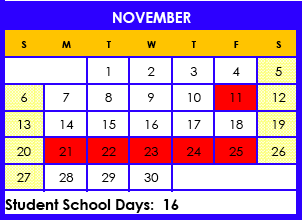
The last day of the semester is Thursday, January 26. Semester 2 begins on Tuesday, January 31.
Please make sure all of your LP5 work is complete and in my hands (or on my computer) by 5pm on Thursday.
Friday and Monday are teacher work days. You have off!
Monday, January 23, 2012
Tuesday, January 17, 2012
Community College Classes
Are you taking community college classes? If so, remember to:
- Let me know your schedule as soon as possible
- Keep all of your receipts, Visions may reimburse you for class fees and books
- Make sure you request an official transcript to be sent to Mr. Naz at Visions at the end of each college semester
- Remember that your Visions classes come first, you must keep your Visions grades up to be eligible to attend college courses while enrolled in high school
Monday, January 9, 2012
Welcome Back!
I hope you had a relaxing break. I know I did. It can be hard to get back into the swing of things so take it slow and make sure you are working everyday. The semester is almost over and you will want to finish strong.
I have been busy today ordering books for semester 2 courses. I will be sending out an email copy of your Master Agreement this week so you can look over your planned courses and make any changes as soon as possible.
Check your grades and your progress, and make sure you know exactly what you need to do to get the grades you want this semester.
Let me know if there is anything I can do to help.
I have been busy today ordering books for semester 2 courses. I will be sending out an email copy of your Master Agreement this week so you can look over your planned courses and make any changes as soon as possible.
Check your grades and your progress, and make sure you know exactly what you need to do to get the grades you want this semester.
Let me know if there is anything I can do to help.
Important Upcoming Dates
Monday, January 16 - No school - Martin Luther King Jr. Day
Thursday, January 26 - Last day of LP5 and end of semester 1
Friday, January 27 - No school, teacher work day
Monday, January 30 - No school, teacher work day
Tuesday, January 31 - First day of semester 2, first day of LP6
UC Berkeley Visit
I am working on scheduling a group tour of the UC Berkeley Campus. Berkeley begins to accept tour reservations for Spring term on January 17.
If you are interested in the tour:
1) Email me any absolute times and days you can't come.
2) Email me if you will need transportation.
3) If you are taking college classes next semester, email me your schedule as soon as you have it
When we return from break, I will begin organizing.
Meanwhile, take a look at the UC Berkeley site to see what they offer in terms of campus tours and information.
UC Berkeley Visitor Information
Google Map - UC Berkeley Location
Monday, December 19, 2011
Monday, December 5, 2011
Google Docs
I love the way you are using Google Docs! It is a super way to share assignments with me.
It can get confusing though. So..
I have some guidelines I would like you to follow when submitting your assignments by Google Docs.
Please title your pages like this:
FirstNameLastInitial
Subject
Assignment #
Example:
TamsenB Eng4 #12
Also, please consolidate as much as you can from each assignment into one document. You can put many parts of an assignment in the same document. For example, if you are working on English, go ahead and put all of one assignment in one document and make subtitles for the sections.
This will make it much easier to grade and keep track of your work.
Thanks!
It can get confusing though. So..
I have some guidelines I would like you to follow when submitting your assignments by Google Docs.
Please title your pages like this:
FirstNameLastInitial
Subject
Assignment #
Example:
TamsenB Eng4 #12
Also, please consolidate as much as you can from each assignment into one document. You can put many parts of an assignment in the same document. For example, if you are working on English, go ahead and put all of one assignment in one document and make subtitles for the sections.
This will make it much easier to grade and keep track of your work.
Thanks!
Tuesday, November 29, 2011
Welcome Back
I hope you had a great Thanksgiving. It can be difficult to start back up with work on these chilly dark days, but we must. Grab a cup of hot chocolate, settle in with your computer and your books and knock out a few assignments. Trust me, getting behind will not help :) You should be starting up with your LP4 work today. Your assignments are up in Launchpad and if you have any questions, give me a call. Remember to check your grades in Engrade regularly and contact me with questions. See you soon!
BTW...At our next meeting we will be deciding on the classes you will take for Spring semester and creating your Spring MAs. Give a thought to what you might like as electives so we can make sure you are getting the best from your year!
Book Fair and Student Pictures
Scholastic Book Fair
December 6 - 9, 2011
Tuesday - Thursday: 9:00 am – 4:00 pm
Friday: 9:00 am – 2:00 pm
Carmichael Resource Center
4762-A Manzanita Ave, Carmichael, CA 95608
Click here to see the flyer for the Book Fair!
Lifetouch Photography - Student Picture Opportunity
When: Thursday. December 8, 2011
Time: 10:00 am- Noon and 12:30 pm - 4:00 pm
Where: Main Visions Offices. Building A.
(Home School Orientation Room)
Once again, Lifetouch Photography will be on campus if you would like to have portraits taken of your student(s) and siblings. To purchase with a credit card, go online and purchase your picture package before coming to the school.
Bring your printed receipt for the photographer. Online purchasing gives you a much bigger selection of backgrounds to choose from to create the perfect picture package.
Visit www.mylifetouch.com and enter Visions picture day ID number CR011461Y0. Packages purchased the day of the photo shoot must be paid in cash or check. See linked order form for pricing.
You can also get student school pictures at the book fair from Lifetouch. Click here for the Lifetouch order form.
December 6 - 9, 2011
Tuesday - Thursday: 9:00 am – 4:00 pm
Friday: 9:00 am – 2:00 pm
Carmichael Resource Center
4762-A Manzanita Ave, Carmichael, CA 95608
Click here to see the flyer for the Book Fair!
Lifetouch Photography - Student Picture Opportunity
When: Thursday. December 8, 2011
Time: 10:00 am- Noon and 12:30 pm - 4:00 pm
Where: Main Visions Offices. Building A.
(Home School Orientation Room)
Once again, Lifetouch Photography will be on campus if you would like to have portraits taken of your student(s) and siblings. To purchase with a credit card, go online and purchase your picture package before coming to the school.
Bring your printed receipt for the photographer. Online purchasing gives you a much bigger selection of backgrounds to choose from to create the perfect picture package.
Visit www.mylifetouch.com and enter Visions picture day ID number CR011461Y0. Packages purchased the day of the photo shoot must be paid in cash or check. See linked order form for pricing.
You can also get student school pictures at the book fair from Lifetouch. Click here for the Lifetouch order form.
Word Squad
Visions Students,
The Word Squad, a new online publication of VIE student writing, is seeking student writing submissions. The Word Squad will be a digital publication that will showcase our student writers. We need your writing! We are looking for exemplary writing from any of the English 1, 2, or 3 major writing assignments. Your CT has a complete list of all of the categories for which we are seeking submissions. You can submit writing that you have already completed this school year or any upcoming assignments. You are encouraged to submit writing from more that one category.
During the 2011-2012 school year, we will collect writing submissions. In the spring, a group of teachers will decide which of these submissions will be published in our first edition of The Word Squad. Students whose writing has been chosen for publication will be notified before the end of this school year. In the fall of 2012, Visions in Education will launch The Word Squad with a celebration event that all published writers will be invited to.
Students whose work is selected for publication will receive a certificate of achievement, an invitation to our celebration event, entrance into a raffle for a chance to win a variety of prizes, and best of all...the pride that comes with being a published writer.
There are two easy steps to submitting your writing:
Step 1) Fill out information about yourself and your writing in this Google form. Be sure to read the information at the top of the form.
Step 2) Send your submission to thewordsquad@viedu.org. You can email your writing to this Word Squad email address or "Share" it with this email address through Google Docs.
Please include your name, category(writing assignment description), grade, and teacher's name on your writing.
That's it! Once your writing has been received, you will receive a confirmation email and a certificate of participation.
Come on....send us your writing. By next fall, you could be a published writer! We can't wait to read your work!
The Word Squad Staff
Monday, November 14, 2011
Student Work
Make sure to check out some great student work. Just click on the links to the pages under the Blog heading. I will keep adding things all year!
Upcoming Important Dates
- Friday, November 18 - Last Day of LP3
- Monday, November 21 through Friday, November 25 - Thanksgiving Break
- Monday, December 25 through Friday, January 6 - Winter Break
Monday, November 7, 2011
Student Work
I am so impressed with the quality of work I am seeing in the English projects and writing assignments! You are all doing such an amazing job. I will be sharing some student work on the blog next week. Make sure you came back to take a look!
This Week's ONLINE Meetings
Remember, meetings this week are online. Make sure you have followed the instructions on how to prepare, then just click on the "My Elluminate Room" link on the left at your meeting time.
Tuesday - Online
Audrey - 12 noon
Jalila - 3:30 pm
Wednesday - Online
Ana - 9:00 am
Thursday - Online
Tuesday - Online
Audrey - 12 noon
Jalila - 3:30 pm
Wednesday - Online
Ana - 9:00 am
Thursday - Online
Haven - 12:30
Michelle - 1:30
Tylor - 2:30
Friday - Veteran's Day!
Michelle - 1:30
Tylor - 2:30
Friday - Veteran's Day!
Monday, October 31, 2011
Progress Grades
Learning Period (LP) 2 progress grades have been posted.
To see your Progress grade:
- Log in to Launchpad
- Click on the My Info link (I think this has changed. I can't see what the student sees so please let me know what it is now. I think it might be More Information.)
- Click on My Progress Grades
- Make sure to set the LP. You may have to change the number in the drop down box and click “Set LP”
Look in the progress grade column of your assignment summary
Don't worry about the assignments average and assignments complete columns. They only refer to work done and graded in launchpad. The progress grade column is accurate.
Your Engrade grade may be different from your Progress grade as it may include work that has been done in the new LP.
Let me know if you have any questions!
This Week's ONLINE Meetings
Remember, meetings this week and next are online. Make sure you have followed the instructions on how to prepare, then just click on the "My Elluminate Room" link on the left at your meeting time.
Monday
Christy - 1:30
Wednesday
Anthony - 11 am
Andrea - 12 noon
Angie - 3:00 pm
Thursday
Monday
Christy - 1:30
Wednesday
Anthony - 11 am
Andrea - 12 noon
Angie - 3:00 pm
Thursday
Belinda - 12 noon
Sara - 1:30 pm
Friday
Alissia - 12 noon
Sara - 1:30 pm
Friday
Alissia - 12 noon
Alex - 1:30 pm
Margaret - 3:30
Margaret - 3:30
Upcoming Online Meetings - This Week and Next!
How to prepare:
Meeting online is easier than it looks. There are a few things to do to make sure your computer is ready though. These things take about 15 minutes, but it is important to do them way in advance of our meeting time so you have plenty of time to troubleshoot if you need to.
- Go to: http://support.blackboardcollaborate.com/ics/support/default.asp?deptID=8336&task=knowledge&questionID=1279
- Step One: Check system requirements. The page will do this automatically and give you recommendations or let you know you are ready.
- Step Two: Configuring Your System. Visit the configuration room to see what our classroom will look like and set up your audio.
- Step Three: Training and Resources. Click on the link that says “Recorded Introduction”. Your computer may ask you if you want to accept the files. Make sure to say yes.
Other things to keep in mind when we have online meetings:
- Make sure you are organized and ready to go when the meeting starts. Have all of your work available, and make sure your folder is easily accessible for your assignment sheet and any logs you need.
- You may need to print new assignment sheets, logs or other paperwork, make sure you have a printer available if possible.
- Use Google Docs for journals, essays, and as much other written work as possible. This way we can both view it during the meeting.
- Do as much of your work as possible on launchpad. This way I can have it graded and ready for questions during the meeting.
- Scan photos, pictures of projects, paperwork, etc. We can share files and images in the classroom.
- You can also share links with me and we can look at things together. For example, if you have created a Prezi, a Glogster, a timetoast, or any other web based project, have the link ready for out meeting so we can look at it together.
Monday, October 24, 2011
GoAnimate!
GoAnimate4Schools.com: English Project by Tamsen Bryon
Like it? Create your own at GoAnimate4Schools. It's free and fun!
Holiday Card Contest
Check out the prizes:
- First prize - 9-12: $500
- Second prize - 9-12: $350
- Third prize - 9-12: $150
Download the Flyer
Monday, October 17, 2011
Celebration for Student Success
Visions students who scored proficient or advanced on either the ELA or Math section of last year's CST have been invited to a celebration of their success. This year there were over 900 Visions students receiving this honor. Visions is holding one celebration in Sacramento this evening and the other, for those of us who live in the Bay Area, in Concord on Thursday.
Join me in congratulating the students from our class that have been invited:
Alissia
Ana
Jalila
Margaret
Sara
I hope to see you there!
Subscribe to:
Posts (Atom)